Print at Actual Size
Print the check sheet below at 100%, measure the 150 mm ruler and the space around the square, and enter the numbers. You get the exact scale your printer used, the likely cause, the custom scale that would fix it, and how far off-center the page landed.
By Online Printer Test PageLast updated
Printed? How did it look?
- Scale: 100% or Actual size, not Fit to page
- Headers and footers: off
- Paper in the tray matches US Letter
What to look for: print size and margin check
- Measure the 150 mm ruler with your own ruler. Anything shorter means the page was scaled down.
- Measure from each edge of the paper to the 100 mm square. Unequal left and right distances mean the print is off-center.
- The small edge scales show how close to the edge your printer can print.
What to look for: alignment test page
- Vertical lines should be straight and single. Jagged or doubled lines mean the print head needs aligning.
- In the registration crosses, the colored lines should sit on top of each other.
- Diagonals and the circle should be smooth, not stepped.
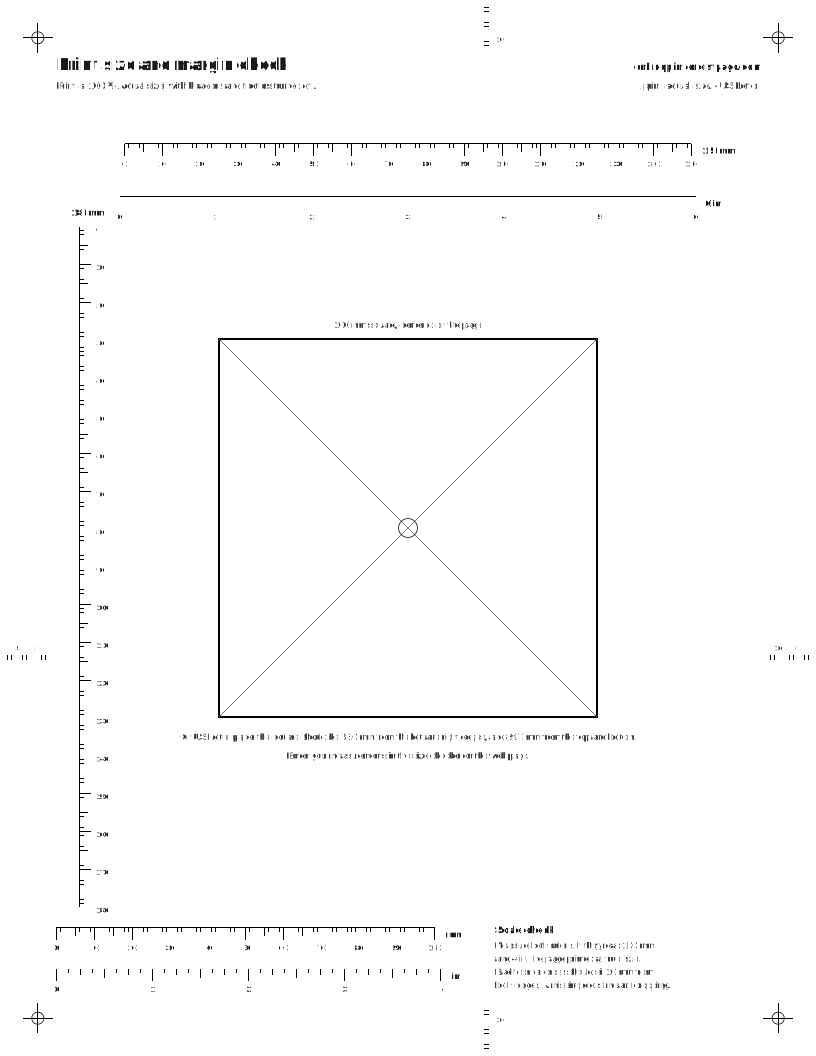
Size and centering checker
Print the check sheet above at 100%, then measure it with a ruler. Fill in what you can; the two rulers alone are enough to check the scale.
Measure from the 0 tick to the 150 tick.
From 0 to 180, down the left side.
Result
Waiting for measurements
Enter at least the 150 mm ruler length.
Why prints come out the wrong size
- Fit or shrink settings. “Fit to page”, “Shrink oversized pages” and “Fit to printable area” all scale the page down slightly so it fits inside the printer’s margins.
- Paper size mismatch. An A4 page fitted onto US Letter prints at about 94% (279.4 ÷ 297), and a Letter page fitted onto A4 at about 97% (210 ÷ 215.9). The checker spots both.
- Borderless printing. Expands the image past the paper edges, so everything prints slightly larger.
- The app’s own scaling. PDF viewers, image editors and browsers each have their own Fit option, separate from the printer’s.
- The printer driver on Windows. See the next section.
Windows: check which printer driver you are using
Windows can print to many printers with its built-in Microsoft IPP Class Driver, without installing anything from the printer maker.[1] Since July 1, 2026, Windows prefers that built-in driver when it sets up a printer.[2] It works well for most jobs, but Microsoft notes that some printer functions are only available through the maker’s driver or app.[3]
On r/printers, people with Brother printers that shrank every print at 100% fixed it by switching from the Windows class driver to Brother’s own driver.[4] That is a community report, not an official fix, but it is quick to test:
- Open Settings > Bluetooth & devices > Printers & scanners, choose the printer, then Printer properties. In the r/printers thread, people found the driver name on the Advanced tab and on the Windows test page.[4]
- If it says Microsoft IPP Class Driver and your prints are scaled, download the full driver package from the printer maker’s support site. Windows still allows maker driver packages to be installed.[5]
- Print this check sheet again with the maker’s driver selected. Some setups list the printer twice afterwards; pick the copy that uses the maker’s driver.
Set 100% scale in your browser or system
Edge / Windows
Print at actual size with headers/footers controlled (Edge)
- Press Ctrl + P (Windows) or Command + P (Mac), or use Settings and more (...) > Print.
- Open More settings.
- Under Scale, choose Actual size (prints without scaling) instead of Fit to printable area.
- Under Margins, pick Default, None, Minimum or Custom.
- Tick More settings > Headers and footers to add the date header and page-number footer, or leave it unticked to omit them; More settings > Background graphics controls page backgrounds.
Source: Print in Microsoft Edge | Microsoft Support (support.microsoft.com), checked Oct 12, 2026.
Update or reinstall the printer driver
- Open Start > Device Manager.
- Expand Printers.
- Right-click your printer and choose Update driver.
- If no update is found, choose Uninstall device, then restart the PC so Windows can reinstall the driver.
Source: Fix printing problems in Word, Excel, or other apps | Microsoft Support (support.microsoft.com), checked Oct 12, 2026.
Chrome
Open Chrome's print dialog
- Open the page, image or file in Chrome.
- Click File > Print, or press Ctrl + P (Windows/Linux) or Cmd + P (Mac).
- Pick the destination and adjust print settings in the window that appears, then click Print.
Source: Print from Chrome - Computer - Google Chrome Help (support.google.com), checked Oct 12, 2026.
Firefox
Firefox print preview settings
- Click the menu button, then Print... to open print preview.
- Choose Destination, Copies, Orientation, Pages and Color mode.
- Expand More settings for Paper size, Scale, Pages per sheet, Margins, Format, Two-sided printing, Print headers and footers and Print backgrounds.
- Click Print.
Source: How to print web pages in Firefox | Firefox Help (support.mozilla.org), checked Oct 12, 2026.
Mac and Safari
Print at 100% / control scaling in the Mac Print dialog
- Choose File > Print.
- Set Scaling to 100% (below 100 shrinks, above 100 enlarges).
- In Paper Handling, leave Scale to fit paper size off for true size; if you need it, Scale Down Only shrinks only pages too big for the paper.
Source: Print settings on Mac - Apple Support (support.apple.com), checked Oct 12, 2026.
Safari webpage print options
- In Safari, open the webpage and choose File > Print.
- If the options aren't visible, click Show Details at the bottom of the Print dialog.
- Open the options pop-up menu (in the separator bar), choose Safari, then set the webpage options (backgrounds; web address and date in headers and footers).
Source: Print or create a PDF of a webpage in Safari on Mac - Apple Support (support.apple.com), checked Oct 12, 2026.
When the exact size matters
Most documents look fine at 97%. It matters for sewing and craft patterns, stamps and stencils, labels and sticker sheets, print-then-cut projects, forms that must line up with pre-printed paper, and scale drawings. For those, run the check once per printer and paper size, write down the result, and keep the sheet.
If the scale is right but colors or lines look wrong, the printer test page and the problem finder cover the rest.
Questions people ask
Why does my printer print smaller than actual size?
Usually a scale setting: “Fit to page”, “Shrink oversized pages” or “Fit to printable area” in the app or print dialog. A paper size mismatch shrinks pages too: an A4 page fitted to US Letter prints at about 94%, and Letter fitted to A4 at about 97%. On Windows, check which printer driver is in use as well.
How do I print at 100% scale?
In the print dialog, set Scale to 100% or choose Actual size instead of Fit. Make sure the paper size matches the paper in the tray, and turn off borderless printing unless you need it. Then print the check sheet on this page and measure it.
Why is my printout off-center?
Loose paper guides, a different paper size than the one selected, or a margin or position setting in the app. Many printers also have slightly different unprintable margins on each side, so an offset of a millimetre or two is normal.
Why does borderless printing make my picture bigger?
To print to the very edge, the printer enlarges the image slightly so it spills past the paper edges, which crops a little from each side. Turn borderless off when the size has to be exact, such as for templates, stamps or sewing patterns.
Can I fix the size with a custom scale?
Yes, if the error is the same across and down. The checker gives you the exact percentage. If the across and down measurements differ, a scale setting cannot fix it; the cause is usually the paper feed or the driver.
Sources
- [1] End of Servicing Plan for Third-Party Printer Drivers on Windows (Microsoft)Since Windows 10 21H2, Windows supports Mopria-compliant printers over network and USB with its built-in Microsoft IPP Class Driver, without the maker's installer.
- [2] End of Servicing Plan for Third-Party Printer Drivers on Windows (Microsoft)From July 1, 2026, Windows changes its printer driver ranking to always prefer the built-in IPP class driver.
- [3] Using Microsoft IPP Class Driver with the Universal Print connector (Microsoft)Microsoft notes that some printers have functions available only through the maker's driver or Print Support App, and recommends checking Printing Preferences.
- [4] Solved: Brother Printer Doesn't Print Exact Actual Size (r/printers) (Reddit, community thread)Community report (not an official source): r/printers users found a Brother printer shrank prints at 100% with the Windows class driver, and printed at true size after switching to the maker's driver.
- [5] End of Servicing Plan for Third-Party Printer Drivers on Windows (Microsoft)Windows continues to allow printer drivers supplied by the maker to be installed from the maker's own installation package.
Checked 2026-10-13. The 94% and 97% figures are simple arithmetic from the ISO and ANSI paper dimensions.
Related
- Printer test pageEvery sheet has a true-size ruler.
- Alignment test pageGrid and circle for distortion.
- Test page prints, documents don’tApp and driver settings.
- Print the Windows test pageIt shows the driver name.
- Printer problem finderStart from what your printout looks like.
- Test print imagesPhoto and gradient sheets.