Laser Printer Streaks, Lines and Smudges

Laser faults come from toner, the drum, rollers or the fuser, not from clogs, so inkjet cleaning will not help. Print the laser uniformity page, answer the checker’s questions, and if marks repeat down the page, measure the gap. The ruler matches it to a part using tables from the makers’ manuals.

By Online Printer Test PageLast updated

Laser test pages
Paper size

Set from your region. Change it if your tray holds the other size.

Download PDF
  • Scale: 100% or Actual size, not Fit to page
  • Headers and footers: off
  • Paper in the tray matches US Letter

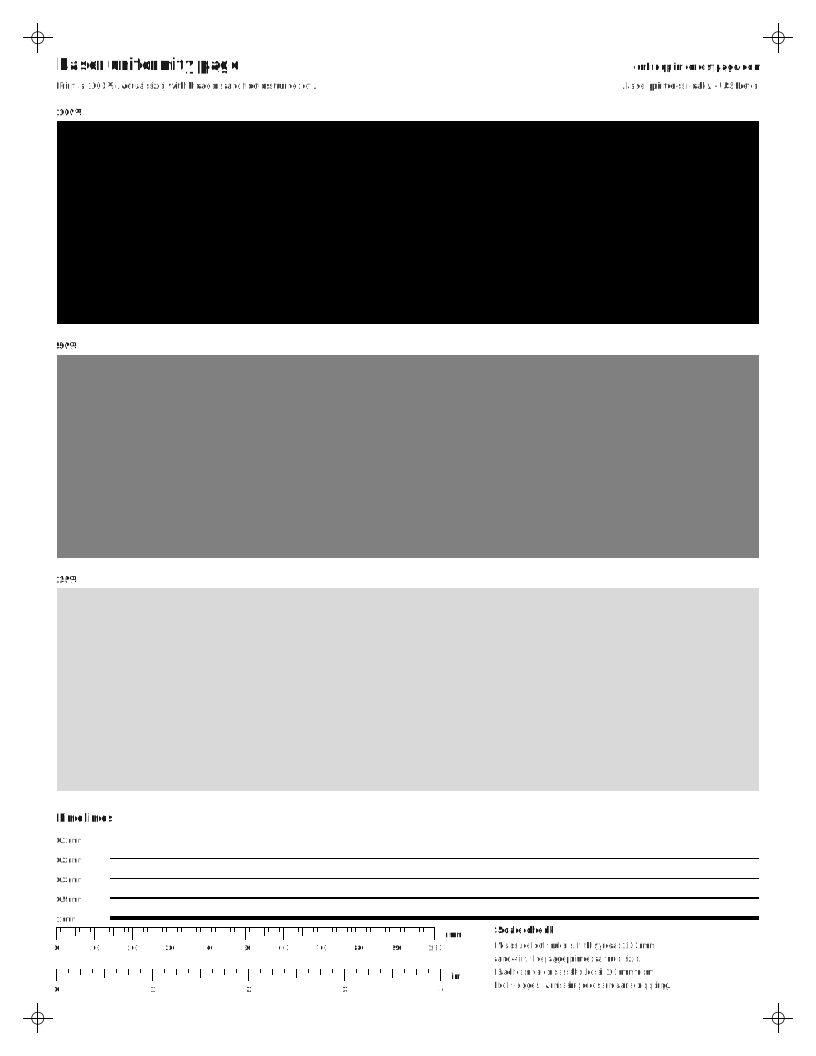
What to look for: laser uniformity page

  • Vertical light streaks in every field usually mean low toner or a dirty part along the paper path.
  • Dark lines or specks that repeat down the page come from a roller. Measure the gap on the repeat-defect page.
Laser printer uniformity test page with full-width solid black, 50% gray and 15% gray fields and fine lines.
Full-width black, gray and light-gray fields. Vertical streaks, light bands and specks show clearly. Heavy ink use.

Laser print problem checker

What do you see on the page?

Print the laser uniformity page if you are not sure. Large flat areas make every fault easier to see.

Repeat-defect ruler

Print the repeat-defect page, find a mark that repeats down the sheet, and measure from one mark to the same point on the next.

Unit

We compare within 3 mm, because a ruler reading by eye is rarely closer than that.

Enter a distance to see matches.

Tables we have verified so far:Brother (support.brother.com), HP (hp.com). Distances differ by model, so a match is a strong hint, not proof. Your manual’s repetitive-defect table is the final word.

Steps for your printer brand

Exact menu steps from each maker’s manuals, by model, with sources.

How do I measure a repeating defect?

  1. Print the repeat-defect measuring page from the picker above. Its light gray field makes marks easy to see. On a color laser, print the four-page CMYK repeat set instead: a mark that shows on only one color page points to that color’s cartridge or drum.
  2. Find one mark, then the next copy of it lower on the page.
  3. Read the distance on the side scale, or measure with a ruler from the top of one mark to the top of the next.
  4. Enter it in the ruler above. If there is no match, look up the repetitive-defect table in your printer’s user guide.

Light streaks, dark streaks and spots

These faults are specific to toner printers, which build the page on a drum and melt it on with a fuser. If you are not sure which kind of printer you have, the inkjet vs laser guide explains the difference.

  • Light vertical streak, same place every page: low toner, a dirty corona wire, or dust on the scanner window.
  • Dark vertical line: a scratch on the drum or toner buildup on a roller.
  • Spots at a fixed gap: something stuck to or damaged on a roller or the drum. Brother’s support pages, for example, tie 94 mm spots on many of its color lasers to the drum unit and 29 mm spots to the toner cartridge.
  • Gray background haze: often a worn drum or toner cartridge near the end of its life.
  • Faint copies of earlier text: print the two-page ghosting and drum refresh test. Text showing inside the 40% boxes on page 2 means the drum is not refreshing; text inside the empty outlines is ghosting.

Questions people ask

Why is my laser printer printing lines?

Light lines usually mean low toner or something blocking the laser’s path to the drum. Dark lines usually mean a scratched drum or a dirty roller. Marks that repeat at a fixed gap point to a specific roller, which you can identify by measuring the gap.

Why is my printer smudging?

On a laser printer, smudging means toner is not being fused to the paper. Check the paper type setting, use dry paper, and if it continues on plain paper the fuser may be failing. On an inkjet, smudges usually come from ink on the rollers or the head rubbing curled paper.

What causes laser printer ghosting?

Toner left on the drum or fuser from one turn shows up faintly on the next. The wrong paper type setting can cause it, as can a worn drum or fuser. The distance between the original and the ghost points to the part.

Can I use an inkjet test page on a laser printer?

You can, but it will not tell you much. Inkjet pages look for clogged nozzles, which laser printers do not have. The laser set here uses large flat fields and a measuring scale, which show toner and roller faults clearly.