Printer Test Page
Pick a pattern, check the paper size, then press Print now. Every page prints at true size with a ruler on it, so you can tell if your browser shrank it. Compare your printout with the notes beside the preview to spot weak ink, streaks or misalignment.
By Online Printer Test PageLast updated
Printed? How did it look?
- Scale: 100% or Actual size, not Fit to page
- Headers and footers: off
- Paper in the tray matches US Letter
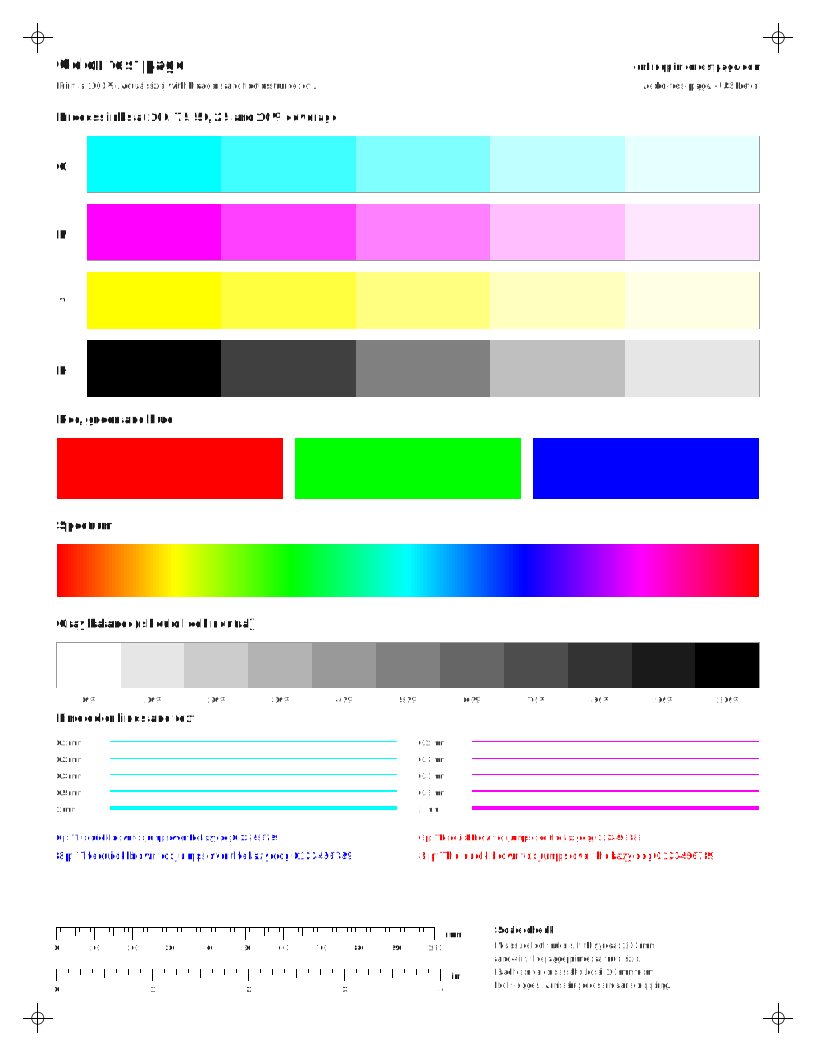
What to look for: color test page
- Each C, M, Y and K row should step evenly from solid to pale. A missing or streaky row points to that ink.
- The gray ramp should look neutral. A pink, green or blue cast means one color is printing weak or strong.
- The spectrum should flow without hard bands or gaps.
What to look for: black and white test page
- The solid black block should be even, with no white lines or streaks.
- You should be able to tell every gray step apart. Steps that merge at the dark end mean heavy ink or toner.
- Small text should be sharp, not fuzzy or doubled.
What to look for: cmyk color bars
- Compare the columns side by side. A column that is paler or streakier than the others is the ink to check.
- Each column should fade smoothly to white with no missing steps.
What to look for: nozzle check grid
- Every step of each staircase should be complete. A missing step or broken line points to that ink.
- Thin white lines across a solid block are the classic clogged-nozzle sign.
- For a nozzle-by-nozzle reading, also run your printer’s own nozzle check.
What to look for: alignment test page
- Vertical lines should be straight and single. Jagged or doubled lines mean the print head needs aligning.
- In the registration crosses, the colored lines should sit on top of each other.
- Diagonals and the circle should be smooth, not stepped.
What to look for: photo test print
- Skin should look natural, not orange, green or gray.
- Smooth areas like cheeks and backgrounds should be free of grain lines.
- Compare the gray ramp with the photo. A cast in both points to color balance, not the photo.
What to look for: ink-saver color check
- Every small patch should be solid and even. A patch with gaps or stripes points to that ink.
- Each mini ramp should step from dark to light with no missing step.
- Good for a weekly check or for printers low on ink.
What to look for: laser uniformity page
- Vertical light streaks in every field usually mean low toner or a dirty part along the paper path.
- Dark lines or specks that repeat down the page come from a roller. Measure the gap on the repeat-defect page.
Which test page should I print?
Start with the problem you can see on paper. Each pattern is built to make one kind of fault obvious.
| What you see | Pattern to print | More help |
|---|---|---|
| A quick all-round check | Color | Color test page |
| Black text looks gray or streaky | Black & white | Black and white test page |
| One color is missing or weak | CMYK | Single-color pages |
| White lines or gaps in prints | Nozzle check | Nozzle check reader |
| Text looks doubled or lines are jagged | Alignment | Alignment page |
| Photos look off | Photo | Test print images |
How do I read my test page?
- Measure the rulers first. If the 100 mm ruler is shorter than 100 mm, the page was scaled. Fix the print setting before judging anything else.
- Look at solid areas. Thin white lines running across a block usually mean clogged nozzles on an inkjet. Long streaks running down the page on a laser printer point to the toner or drum.
- Compare the colors. If one ink row is pale, patchy or missing while the others look fine, the problem is that one ink, not the whole printer.
- Check fine text and lines. Doubled or jagged edges usually mean the print head needs aligning.
Not sure what you are looking at? The printing lines troubleshooter and the nozzle check reader walk you through it one question at a time.
Why doesn’t my printout match the preview?
To measure exactly how far off a print is, use the print size and margin checker. Three settings cause most mismatches. Scale: “Fit to page” or “Shrink oversized pages” makes everything smaller, so set 100% or Actual size. Paper size: printing an A4 page on Letter paper crops the bottom, and the reverse leaves a gap. Headers and footers: some browsers add the date and web address in the margins; turn them off in the print dialog.
Color will never match a screen exactly. Screens mix light, printers mix ink. What you are checking is that every ink prints evenly, not that the page looks identical to your monitor.
What a browser test page can and can’t tell you
This page goes through the same driver and print dialog as your documents, so it tests the whole path from your computer to paper. It can’t fire individual nozzles or read the printer’s sensors. For that, run the printer’s own nozzle check or print quality report. The HP, Epson, Canon and Brother pages list the menu steps from each maker’s manuals.
If the printer prints its own test page but nothing from your computer, the hardware is probably fine. Work through test page prints but documents don’t instead.
What does a printer test page look like?
A good printer test page is mostly known quantities. Ours has a row for each process ink (cyan, magenta, yellow and black) stepping from solid down to 10%, solid red, green and blue blocks, a color spectrum, a gray ramp from white to black, fine lines from 0.1 mm to 1 mm, and small text. Along the bottom sit a 100 mm ruler and a 4 inch ruler, and a small cross sits 10 mm in from each corner.
Every element has a job. Solid blocks show banding and streaks. Tint steps show whether an ink is weak. The gray ramp shows color balance, because many color printers mix gray from all three colors. Fine lines and text show sharpness and alignment. The rulers and corner crosses show whether the page was scaled or cropped on its way to paper.
How to print a test page online
- Pick a pattern above. Color is the best all-round choice; Black & white saves color ink.
- Check the paper size. We set Letter or A4 from your region, and you can switch it.
- Press Print now. The print dialog opens in this tab, with no pop-up window.
- In the dialog, choose your printer, set scale to 100% or Actual size, and turn headers and footers off.
- Print, then compare the sheet with the notes under “What to look for”.
Need the computer’s own test page instead, to check the driver and connection? See how to print a test page on Windows, Mac, ChromeOS and Linux.
Prefer a file? Download PDF gives you a vector PDF of the same page. It is handy for printing from another computer, a phone or a print shop, or for keeping a known-good reference.
Printing from a phone works too. Open this page, press Print now, and your phone’s print screen will list nearby wireless printers. Most current printers support Apple AirPrint or Mopria for Android. Check that the paper size on the phone matches the tray.
Free printable test pages for every job
The tool above covers the six most common checks. Each of these pages adds more sheets for one job:
- Color test pages: full CMYK and RGB charts, plus single-color sheets for cyan, magenta, yellow, black, red, green and blue, so you only spend the ink you are checking.
- Black and white test pages: a gray step ramp, a solid black block and a light-ink version for sharpness checks.
- Test print images: a photo with skin tones, market photos, gradients, fine text and line pairs.
- Nozzle check: a printable grid, plus a reader for your printer’s own nozzle pattern.
- Purge and cleaning sheets: per-color purge pages and a weekly maintenance strip.
- Alignment test page: long vertical lines and registration crosses.
- Laser test pages: uniformity, ghosting and repeat-defect sheets for toner printers.
US Letter or A4: why the paper size matters
A printer test page only tells the truth if it fits the paper. Print an A4 sheet (297 mm tall) on US Letter (279.4 mm) and the bottom 18 mm is cut off, which takes the rulers with it. Print Letter on A4 and you get an extra white band that can hide a feed problem. Our sheets are drawn separately for each size, so you never rely on the printer driver to shrink or stretch them.
Why this printer test page is different
Many free test page sites send a single picture to the printer, often at one paper size, in a pop-up window, with no way to tell whether it printed at full size. We built this one to answer the next question too.
- Every sheet is vector, sized to your paper, and measurable with the printed rulers.
- Each pattern says what to look for, and the symptom checkers turn what you see into a likely cause and a fix.
- Brand steps for HP, Epson, Canon and Brother come from each maker’s manuals, with links to the source and the date we checked them.
- There are no accounts and no uploads, and ads never appear on the printed page.
Keep an inkjet healthy between prints
Inkjet nozzles dry out when a printer sits unused (laser toner does not; see inkjet vs laser printers), which is why a test page so often comes back with gaps after a holiday. Printing a little ink every week helps. The ink-saver maintenance strip fits 20 tiny patches on one sheet and comes with a weekly calendar reminder, so a single page lasts about five months.
Questions people ask
Is this printer test page free?
Yes. Every pattern and PDF on Online Printer Test Page is free to print, with no sign-up. Nothing is uploaded: the pages are generated ahead of time and printed straight from your browser.
Will it work with my printer?
It works with any printer your computer or phone can print to, inkjet or laser, because it prints through the normal print dialog. The brand pages cover the extra built-in tests that only the printer itself can run.
Why is there a ruler on the page?
Browsers often shrink pages to fit. The 100 mm and 4 inch rulers show whether that happened. If they measure short, set Scale to 100% or Actual size and print again. The corner crosses show whether anything was cropped.
What is the difference between US Letter and A4?
US Letter is 8.5 × 11 inches (215.9 × 279.4 mm) and is standard in the US, Canada and parts of Latin America. A4 is 210 × 297 mm and is used almost everywhere else. Pick the size that is actually in your paper tray.
How often should I print a test page?
Print one whenever output looks wrong, after changing ink or toner, and after moving the printer. If an inkjet sits unused for weeks, printing something small every week or so helps keep ink moving; the maintenance strip on the head cleaning page does that with very little ink.
Fix a specific problem
- Printer printing linesHorizontal or vertical lines, banding and streaks.
- Faded or missing colorWhen one color or black is weak.
- Blank pagesPaper goes through but nothing prints.
- Clogged print headPurge sheets and a cleaning-cycle advisor.
- Laser streaks and smudgesMeasure repeating marks to find the part.
- All printer problemsPick what your printout looks like.