Printer Printing Faded

If everything is pale, check the print settings first: draft mode, ink saving and the wrong paper type all make prints faded. If only black or one color is weak, that ink is low or clogged. Answer the questions below for steps that fit your printer and ink.

By Online Printer Test PageLast updated

Faded printing checker

What is faded?

Steps for your printer brand

Exact menu steps from each maker’s manuals, by model, with sources.

Faded everywhere, or just one color?

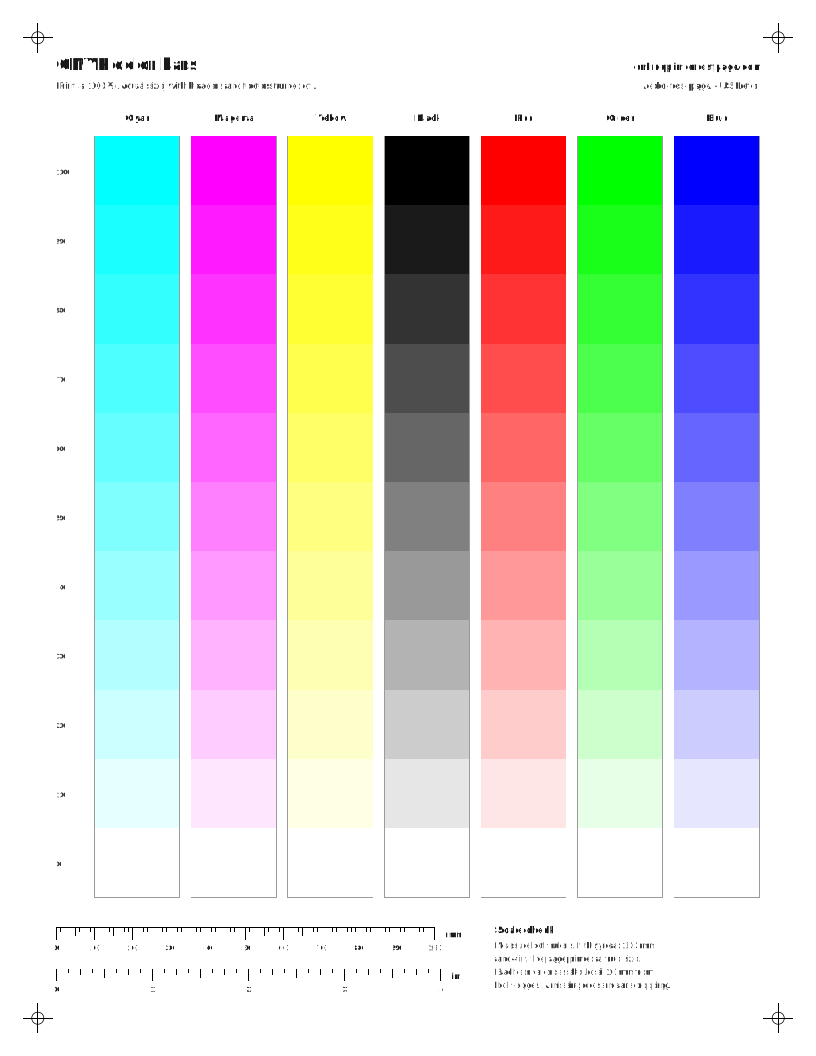
This is the fastest way to narrow it down. Print the CMYK color bars. If every column is equally pale, the cause is a setting or the paper. If one column is paler than the rest, it is that ink.

Settings that make prints light

  • Draft, Fast or Economy quality. Uses less ink on purpose.
  • Paper type. Plain paper selected for photo paper, or the other way round, changes how much ink is used.
  • Grayscale. Some drivers mix black from colors in grayscale mode.
  • Toner save on laser printers.

After a refill or new cartridge

Faded or missing color right after a change often means a seal was left on, the cartridge is not fully seated, or air entered an ink tank line. Remove and reseat the cartridge, check the tank valve, run one cleaning and print a nozzle check.

Questions people ask

Why is my printer printing faded when the ink is full?

Full ink with faded prints usually means clogged nozzles, a draft or economy setting, or the wrong paper type. On refillable tanks, air in the line after a refill can also starve the head until a cleaning pulls ink through.

Why is my printer not printing black?

Black can be empty or clogged while color still works, because they use separate cartridges or nozzles. Check the black level, try “black ink only” in the print dialog, then run a nozzle check.

Why is my printer not printing magenta, yellow or cyan?

The same causes apply to each color: low ink, a clog, or a cartridge not seated. Print the single-color test page for that ink to confirm, then run a nozzle check.

Why is my laser printer printing light?

Toner save mode, a low density setting or a nearly empty cartridge. Rocking the cartridge gently often gives a few better pages, which confirms the toner is low.